July 24th, 2026
Cleaner System Logs and Alerts
Each site now has a dedicated Logs area with separate tabs for message logs, hardware errors, and alerts. The same organized experience is available when reviewing operational information from site and ticket views.
Why This Matters
System activity can include several different types of information, from communication history to active hardware issues. Separating these records makes it easier for O&M and service teams to find the information they need without sorting through one combined list.
How It Works
The Logs area organizes site activity into three tabs:
Message Logs for recorded system messages
Hardware Errors for equipment-related issues
Alerts for conditions that may require attention
Teams can access this information while working from either the site or the related ticket view.
24-Hour Fleet Performance in Sites V2
Sites V2 now includes Daily Estimate and 24h Performance columns, giving teams a faster way to identify recent production changes across the fleet.
Why This Matters
Monthly performance is useful for understanding longer-term trends, but it may not reveal a sudden production drop quickly enough.
The new daily metrics help O&M teams spot systems that performed below expectations during the past 24 hours, prioritize investigation, and respond sooner when a site may need attention.
How It Works
Teams can add the following columns to their Sites V2 views:
Daily Estimate, showing the expected production for the daily period
24h Performance, showing recent production relative to that estimate
These columns can be used alongside existing filters, sorting, and saved views to review short-term fleet performance.
Production-to-Consumption Ratios in Sites V2
Sites V2 can now display and export solar production-to-energy-consumption ratios for both the last 12 months and the lifetime of the system.
Why This Matters
Production totals do not always answer a customer’s most practical question: how much of their household energy use is being covered by solar?
These ratios give installers a clearer way to respond to customer and sales requests, compare solar generation with consumption, and provide additional context around long-term system performance.
How It Works
Teams can add the following ratio fields to Sites V2:
Last-12-month production-to-consumption ratio
Lifetime production-to-consumption ratio
The values can be reviewed within Sites V2 and included when exporting site data for further reporting or customer analysis.
More Energy Data in Site Exports
Site Energy exports from the customer view now include consumption, grid export, and grid import data in addition to solar production.
Why This Matters
A production-only report shows how much energy the solar system generated, but it does not provide a complete picture of how energy moved through the home.
Including consumption, import, and export data helps customers better understand how much electricity they used, how much excess solar energy was sent to the grid, and how much energy was drawn from the grid during the selected period.
How It Works
When a customer downloads a Site Energy report in CSV or XLSX format, the export can now include columns for:
Solar production
Household consumption
Energy exported to the grid
Energy imported from the grid
The additional data is included directly in the downloaded report.
New Automation Trigger for Project Extra Field Changes
Teams can now start an automation whenever a selected project extra field changes.
Why This Matters
Installers often use custom project fields to track information that does not fit into standard project stages, such as equipment details, approval statuses, service-plan information, or other company-specific data.
This trigger allows updates to those fields to automatically start customer communication or internal follow-up workflows, reducing the need for employees to monitor changes and respond manually.
How It Works
When building an automation, teams can select a project extra field and use a change to that field as the trigger.
Once the selected value is updated, Sunvoy starts the connected automation. Teams can then use the existing automation workflow to send a message, notify the appropriate team, or initiate another configured follow-up action.
July 23rd, 2026
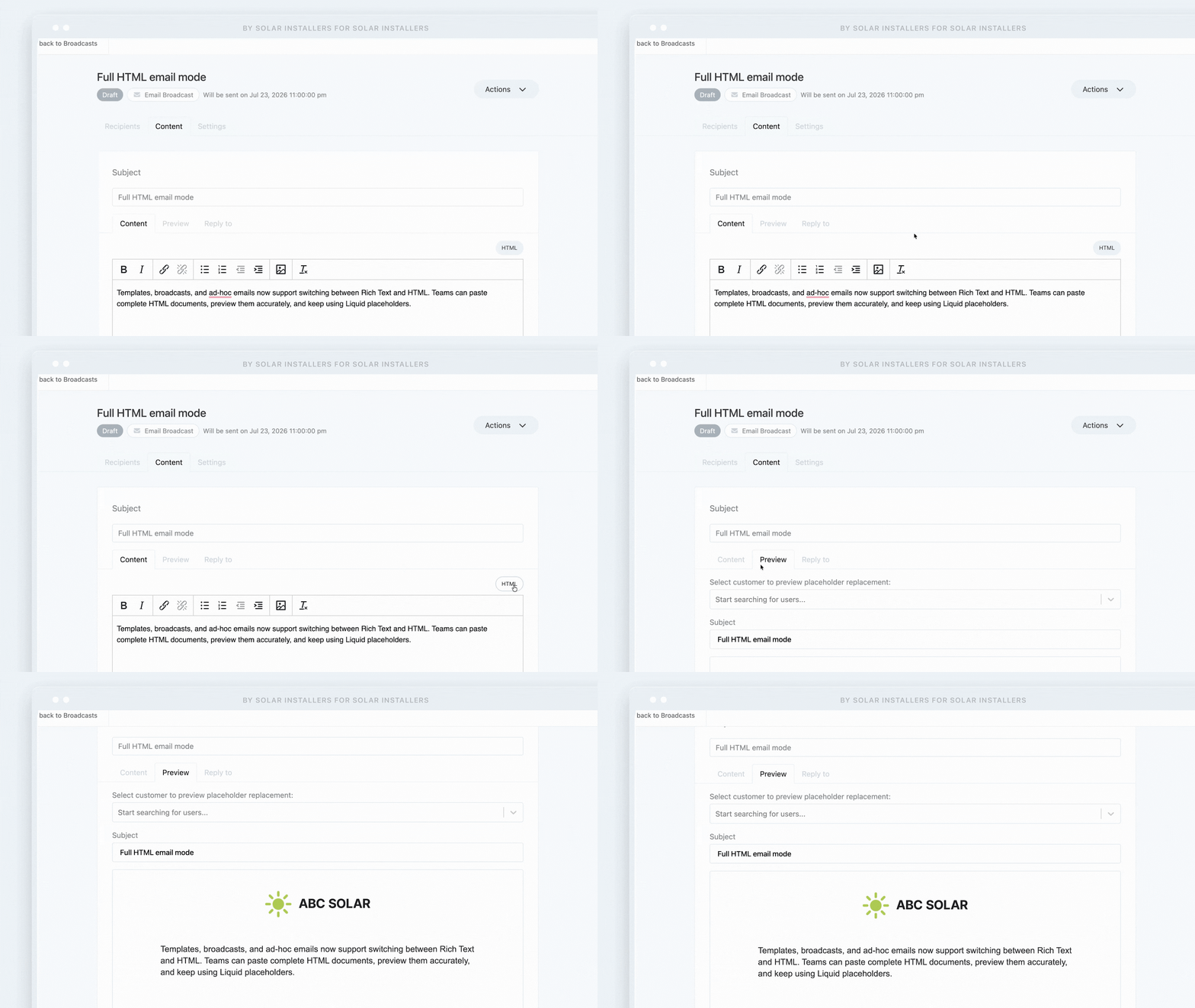
Sunvoy email templates, broadcasts, and ad-hoc messages now support two editing modes: Rich Text and HTML. Teams can paste a complete HTML email document, preview how it will appear, and continue using Liquid placeholders for personalized content.
Why This Matters
Marketing and customer experience teams often need more control over email design than a standard rich-text editor can provide.
Full HTML mode makes it easier to use professionally designed email layouts, maintain consistent branding, and bring existing email code into Sunvoy without rebuilding it block by block. Installers can create more polished project updates, customer broadcasts, promotional campaigns, and post-install communications while keeping those messages connected to their Sunvoy workflows.
How It Works
When creating or editing an email, users can switch between:
Rich Text for straightforward formatting inside the visual editor
HTML for pasting and editing a complete HTML document
Sunvoy renders the HTML in the email preview so teams can review the layout before sending or saving it.
Liquid placeholders remain supported in HTML mode, allowing emails to include dynamic information such as customer or project-specific details. The feature is available for email templates, broadcasts, and individual ad-hoc emails
July 23rd, 2026
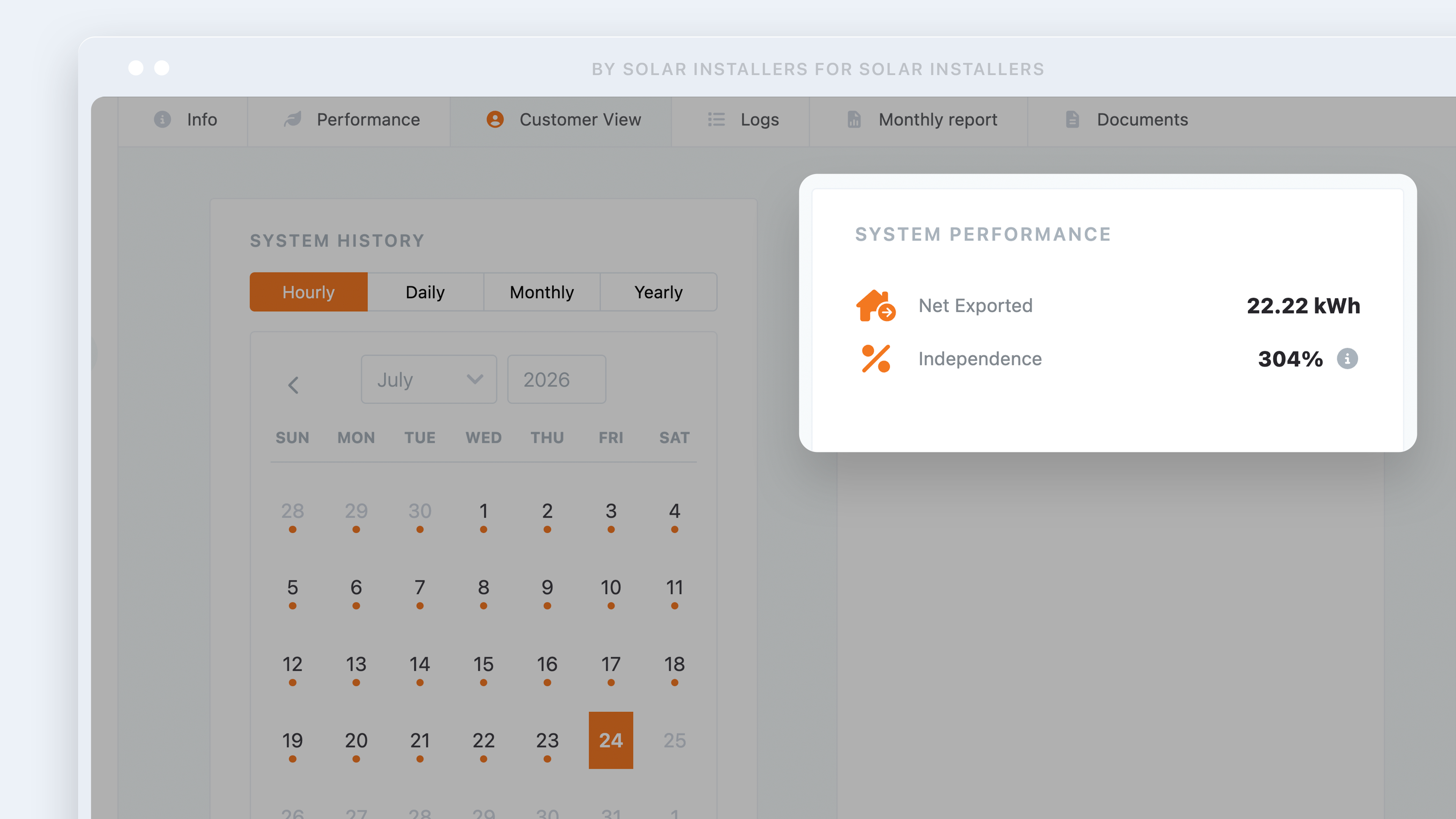
Homeowners can now see their net energy position and solar independence directly in Sunvoy’s performance widget, alongside production and consumption data.
Why This Matters
Production totals alone do not always tell homeowners how much of their electricity use is actually being covered by solar.
These new metrics make the relationship between generation and household demand easier to understand. Customers can quickly see whether they relied on the grid or sent excess solar energy back to it, as well as the percentage of their consumption supplied by their solar system.
This gives installers a clearer, more complete way to explain system performance without requiring homeowners to calculate the difference themselves or check a separate manufacturer portal.
How It Works
Sunvoy uses the system’s production and consumption data to calculate two additional metrics:
Net energy shows the difference between production and consumption. Depending on the result, the widget displays either Net Imported or Net Exported in kilowatt-hours.
Solar independence shows the percentage of household consumption covered by solar production during the selected period.
For example, when a home consumes more energy than the system produces, Sunvoy displays the remaining amount as net imported from the grid. When production exceeds consumption, the excess is displayed as net exported.
Both metrics appear within the existing performance widget, giving homeowners a more complete view of how their system is serving the home.
July 23rd, 2026

Sungrow is now available in Sunvoy’s inverter integrations list, allowing installers that use Sungrow hardware to configure the integration more easily.
Why This Matters
Adding Sungrow to the available integration options helps installers bring more of their monitored systems into Sunvoy and maintain a more consistent experience across their fleet. It also reduces ambiguity during setup by making the supported manufacturer directly selectable.
How It Works
When configuring an inverter integration, users can now select Sungrow from the available manufacturers and enter the required connection details for their account.
Once configured, eligible Sungrow system data can be connected to the relevant projects in Sunvoy.
July 23rd, 2026
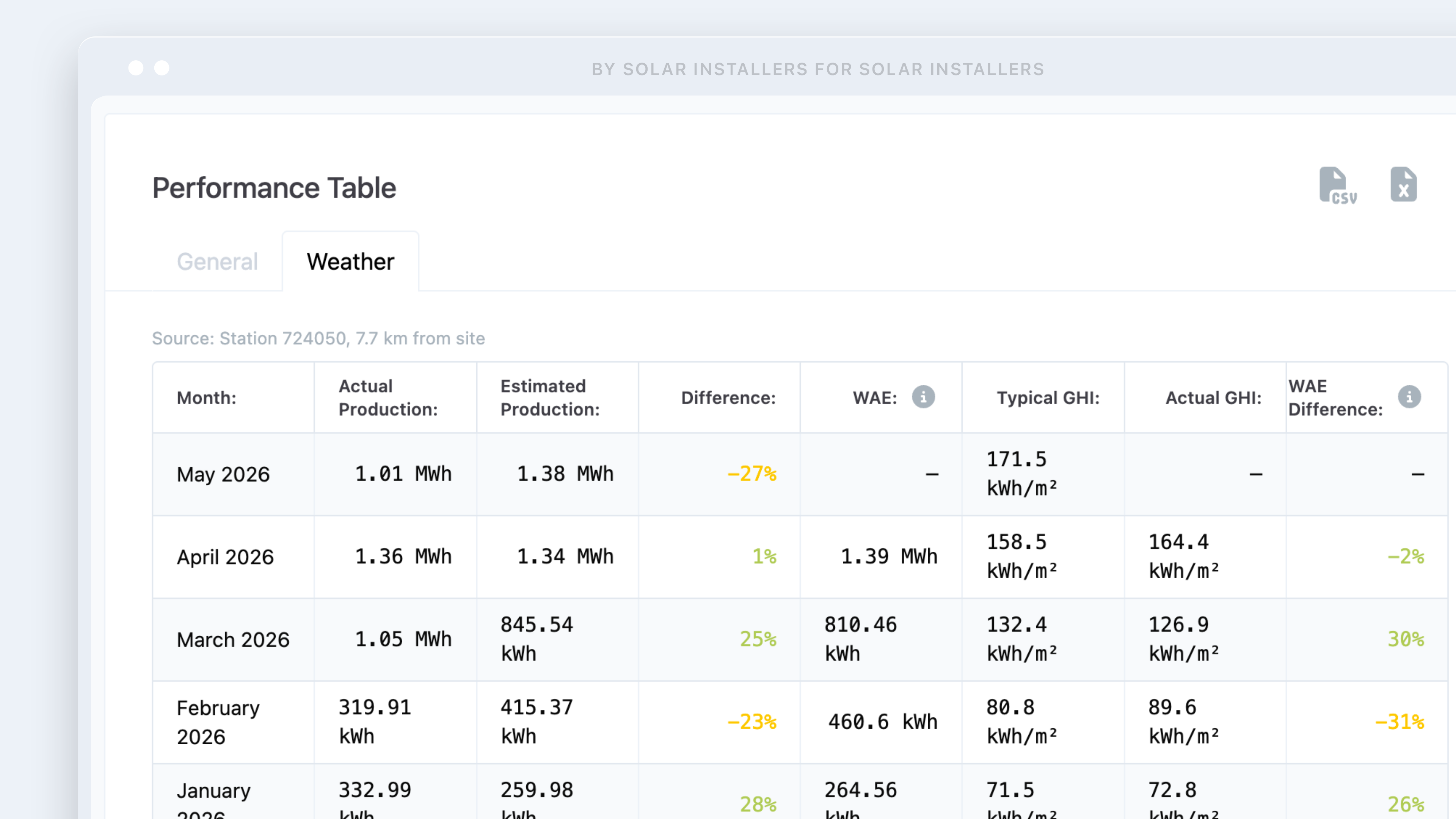
Sunvoy can now show weather-adjusted production data using Open-Meteo irradiance data.
This helps solar teams understand whether a system’s production gap is likely caused by weather conditions or an actual system issue.
Why This Matters
Not every drop in production means something is broken.
Cloud cover, seasonal irradiance changes, and local weather conditions can all affect output. With weather-adjusted performance data, teams can better explain why a system produced more or less than expected.
This helps O&M teams:
Diagnose performance concerns more accurately
Avoid unnecessary truck rolls
Explain production differences to homeowners with more confidence
Separate weather-related dips from true system underperformance

How It Works
Sunvoy compares:
Actual production
Estimated production
Typical GHI
Actual GHI
Weather-adjusted energy expectations
This creates a clearer picture of system performance and helps teams answer the important question:
“Is this system underperforming, or was the weather simply worse than expected?”
July 23rd, 2026

Sunvoy can now connect to ESY inverter systems, giving installers access to hourly production data and live system information within the platform.
Why This Matters
Installers using ESY hardware can now bring those systems into the same monitoring workflow as the rest of their fleet.
This makes it easier for operations and service teams to review production without relying on a separate manufacturer portal. It also gives installers a more consistent way to support homeowners, investigate performance questions, and keep system data connected to the relevant Sunvoy project.
How It Works
Installers can configure ESY as an inverter integration in Sunvoy and connect supported systems to their corresponding projects.
Once connected, Sunvoy can retrieve:
Hourly solar production data
Live view information from the ESY system
This support is now available for customers such as Summit & Shore and other installers using ESY hardware.
March 17th, 2026

Sunvoy now supports three additional hardware and monitoring platforms, expanding compatibility across more inverter and battery ecosystems:
CPS (Chint Power Systems)
PowerTracker (AlsoEnergy/STEM)
Sigenergy
These integrations allow your team to monitor performance data from these systems directly inside Sunvoy.
What This Means
With these integrations enabled, you can:
View real-time production and system health
Receive alerts and error codes
Track performance alongside the rest of your fleet
Manage all sites from a single dashboard
Whether you're supporting residential installs or larger commercial portfolios, these systems are now fully incorporated into your standard monitoring and O&M workflows.
If you’re installing CPS (Chint), PowerTracker, or Sigenergy equipment, you can now connect those systems directly in Sunvoy. Reach out to support if you need help enabling any of these integrations.
March 10th, 2026
Alongside the major releases, we’ve rolled out several smaller improvements that make Sunvoy more flexible for installers, service teams, and sales teams.
1. Custom Ticket Tags for O&M Managers

Installers can create their own ticket tags to better categorize and manage support requests.
Tags can be used to label tickets by type of issue, department, or workflow—for example:
Electrical
Maintenance
Performance
Warranty
Monitoring
These tags make it easier to filter tickets, organize service queues, and identify recurring issues.
You can configure this under:
Settings → Support → Tags
2. Role-Based Project Visibility

Administrators can now restrict project visibility based on user roles and assignments.
This allows companies to ensure that team members only see the sites that are relevant to them.
Examples:
A Project Manager sees only the projects assigned to them
A Sales Rep sees only their own customers
An O&M technician sees only the sites they maintain
This improves both security and usability, especially for larger organizations managing hundreds or thousands of sites.
3. Performance Threshold Filtering

Operations and O&M teams can now filter sites based on performance ranges.
For example, a manager can quickly identify systems performing between 65% and 80% efficiency, helping teams detect underperforming systems before customers report issues.
This allows service teams to proactively investigate:
inverter communication problems
shading issues
equipment faults
or system degradation
4. Sales Map View
Sales teams now have access to a Company Map to view of their installed systems. All systems have a green dot regarless if the inverter is working or not.
This view allows reps to visualize their portfolio geographically, which is helpful for:
planning local outreach campaigns
identifying clusters of installations
demonstrating market presence to prospects
finding nearby references for new customers

5. Push Notifications
You can enable Push Notifications in your app. Reach out to support@sunvoy.com to turn it ON for you. You can see on your dashboard how many customers signed up to get push notifications

Continuous Improvements
These updates are part of our ongoing effort to make Sunvoy more adaptable to how real solar teams operate, across sales, service, and operations.
As always, feedback from installers continues to shape how we prioritize new improvements!
February 17th, 2026
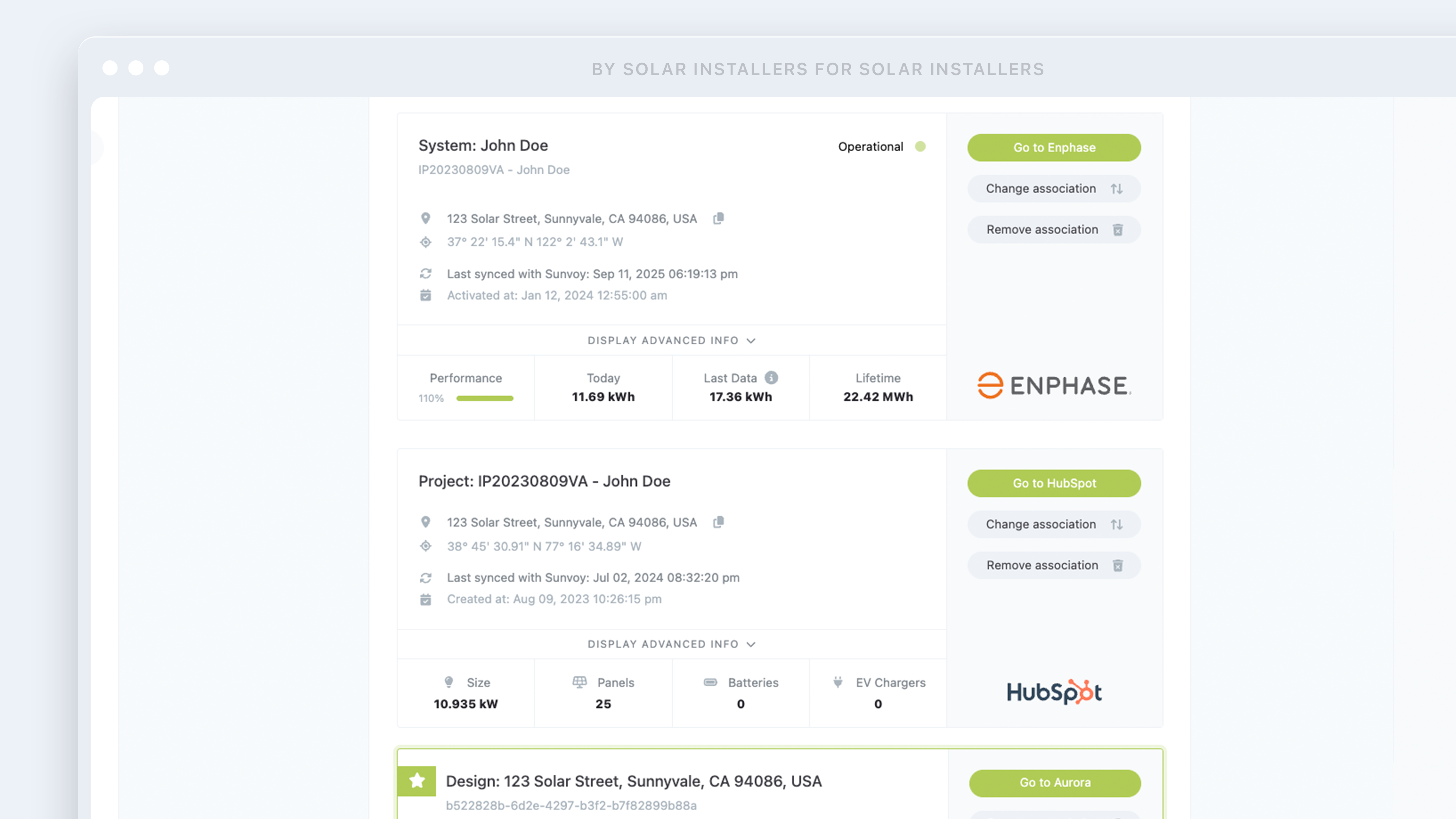
Sunvoy can now identify and help you reconnect with “orphaned systems” or solar customers who exist in your inverter or manufacturer portals but do not exist in your CRM.
In other words:
You’re actively monitoring their system… but you’re not marketing to them.
These are real, installed customers who:
Don’t receive your emails
Aren’t part of your referral campaigns
Aren’t asked for reviews
Aren’t included in service upsells
And may not even remember you installed their system
That’s missed lifetime value.
How It Works
Sunvoy cross-checks:
Manufacturer / inverter app contacts
withYour CRM records
If we find systems tied to people you can access operationally but aren’t tracking commercially, we flag them as orphaned contacts.
From there, Sunvoy helps you:
Recover their contact info
Add them back into your CRM
Re-activate them into your marketing and engagement flows
How to Enable
This feature is available upon request.
Reach out to Sunvoy Support and we’ll activate orphaned system detection for your account.
November 17th, 2025
We’ve launched Sunvoy Concierge, a done-for-you service designed for solar companies who want to grow faster through referrals, reviews, and customer engagement but don’t have the internal bandwidth to manage it all.
This feature helps turn Sunvoy into an active growth engine without requiring your team to manually manage automations, broadcasts, or follow-ups.
What It Does:
Activates and optimizes your automations
We set up and monitor workflows that ask for referrals, request reviews, and re-engage past customers.Writes and sends branded broadcasts
We handle messaging to your customer base using your tone, brand, and company domain, ensuring a consistent customer experience.Performs warm referral outreach
Our team personally calls customers on your behalf to ask for referrals, creating real conversations that feel like they’re coming directly from your team.Tracks and improves performance over time
We monitor engagement and make ongoing improvements to maximize results.
Why It Matters:
Increases referrals and reviews with no extra work for your internal team
Improves outreach consistency by ensuring your tools are being used, not sitting idle
Delivers a branded experience where all messages and calls come from your name, your logo, and your domain (no third-party confusion)
Sunvoy Concierge is ideal for solar teams who are growing fast, but don’t have the time or resources to manage customer communications and follow-ups consistently.
This is a high-touch service that works quietly in the background while your team gets the credit.